Pages

Monday, December 13, 2021

About 64 bit computing – part 2

Why 64 bits?

The question of why we need 64-bit computing is often asked but rarely answered in a satisfactory manner. That this is so is evidenced by the fact that the question keeps coming up again and again in online discussions of AMD's upcoming Hammer processor. There are good reasons for the confusion surrounding the question, the first of which is the rarely acknowledged fact that "the 64-bit question" is actually two questions: 1) how does the existing 64-bit server and workstation market use 64-bit computing, and 2) what use would the consumer market have for 64-bit computing. People who ask the 64-bit question are usually asking for the answer to question 1 in order to deduce the answer to question 2. This being the case, we'll first look at question 1 before tackling question 2.

What is 64-bit computing? [In detail with respect to hardware]

Let us know the code/data distinction and its implications in microprocessor technology. Simply put, the labels "16-bit," "32-bit" or "64-bit," when applied to a microprocessor, characterize the processor's data stream. Although you may have heard the term "64-bit code," this designates code that operates on 64-bit data.

In more specific terms, the labels "64-bit," 32-bit," etc. designate the number of bits that each of the processor's general-purpose registers (GPRs) can hold. So when someone uses the term "64-bit processor," what they mean is "a processor with GPRs that store 64-bit numbers." And in the same vein, a "64-bit instruction" is an instruction that operates on 64-bit numbers.


In the diagram above, white boxes are data, and gray boxes are results. Also, don't take the instruction and code "sizes" too literally, since they're intended to convey a general feel for what it means to "widen" a processor from 32 bits to 64 bits.


One should notice that not all of the data in either memory, the cache, or the registers is 64-bit data. Rather, the data sizes are mixed, with 64 bits being the widest.


Note that in the 64-bit CPU image above, the width of the code stream has not changed; the same-sized opcode could theoretically represent an instruction that operates on 32-bit numbers or an instruction that operates on 64-bit numbers, depending on what the opcode's default data size is. On the other hand, the width of the data stream has doubled. In order to accommodate the wider data stream, the sizes of the processor's registers and the sizes of the internal data paths that feed those registers must be doubled.


Programming models

Now let's take a look at two programming models, one for a 32-bit processor and another for a 64-bit processor.


The registers in the 64-bit CPU pictured above are twice as wide as those in the 32-bit CPU, but the size of the instruction register (IR) that holds the currently executing instruction is the same in both processors. Again, the data stream has doubled in size, but the instruction stream has not. Finally, you might also also note that the program counter (PC) is doubled in size.

For the simple processor pictured above, the two types of data that it can process are integer data and address data. Ultimately, addresses are really just integers that designate a memory address, so address data is just a special type of integer data. Hence, both data types are stored in the GPRs, and both integer and address calculations are done by the ALU.


From <https://arstechnica.com/gadgets/2002/03/an-introduction-to-64-bit-computing-and-x86-64/>

Many modern processors support two additional data types: floating-point data and vector data. Each of these two data types has its own set of registers and its own execution unit(s). The following table compares all four data types in 32-bit and 64-bit processors:

DATA TYPE

REGISTER

TYPE

EXECUTION

UNIT

X86 WIDTH

X86-64

WIDTH

Integer

GPR

ALU

32

64

Address

GPR

ALU or AGU

32

64

Floating-point*

FPR

FPU

64

64

Vector

VR

VPU

128

128

*x87 uses 80-bit registers to do double-precision floating-point. The floats themselves are 64-bit, but the processor converts them to an internal, 80-bit format for increased precision when doing computations.

One can see from the table above that the difference the move to 64 bits makes is in the integer and address hardware. The floating-point and vector hardware stays the same.

Current 64-bit applications

Now that we know what 64-bit computing is, let's take a look at the benefits of increased integer and data sizes.

Dynamic range

The main thing that a wider integer gives you is increased dynamic range. Instead of defining the term "dynamic range," let us know how it works.

In the base-10 number system to which we're all accustomed, one can represent a maximum of ten integers (0 to 9) with a single digit. This is because base-10 has ten different symbols with which to represent numbers. To represent more than ten integers you need to add another digit, using a combination of two symbols chosen from among the set of ten to represent any one of 100 integers (00 to 99). The general formula that you can use to compute the number of integers (dynamic range, or DR) that you can represent with an n-digit base-ten number is:

DR = 10n

So a 1-digit number gives you 101 = 10 possible integers, a 2-digit number 102 = 100 integers, a 3-digit number 103 = 1000 integers, and so on.

The base-2, or "binary," number system that computers use has only two symbols with which to represent integers: 0 and 1. Thus, a single-digit binary number allows you to represent only two integers, 0 and 1. With a two-digit (or "2-bit") binary, you can represent four integers by combining the two symbols (0 and 1) in any of the following four ways:

00 = 0

01 = 1

10 = 2

11 = 3

Similarly, a 3-bit binary number gives you eight possible combinations, which you can use to represent eight different integers. As you increase the number of bits, you increase the number of integers you can represent. In general, n bits will allow you to represent 2 n integers in binary. So a 4-bit binary number can represent 24 or 16 integers, an 8-bit number gives you 28=256 integers, and so on.

So in moving from a 32-bit GPR to a 64-bit GPR, the range of integers that a processor can manipulate goes from 232 = 4.3e9 to 264 = 1.8e19. The dynamic range, then, increases by a factor of 4.3 billion. Thus a 64-bit integer can represent a much larger range of numbers than a 32-bit integer.

The benefits of increased dynamic range, or, how the existing 64-bit computing market uses 64-bit integers

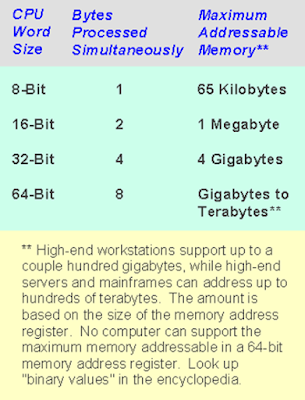
Since addresses are just special-purpose integers, an ALU and register combination that can handle more possible integer values can also handle that many more possible addresses. With all the recent press coverage that 64-bit architectures have garnered, it's fairly common knowledge that a 32-bit processor can address at most 4GB of memory. (Remember our 232 = 4.3 billion number? That 4.3 billion bytes is about 4GB.) A 64-bit architecture could theoretically, by contrast, address up to 18 million terabytes.


From <https://arstechnica.com/gadgets/2002/03/an-introduction-to-64-bit-computing-and-x86-64/>


Of course, there's a big difference between the amount of address space that a 64-bit address value could theoretically yield and the actual sizes of the virtual and physical address spaces that a given 64-bit architecture supports. In the case of x86-64, the virtual address space is 48-bit, which makes for about 282 terabytes of virtual address space. x86-64's physical address space is 40-bit, which can support about 1 terabyte of physical memory.

So, what do you do with over 4GB of memory? Well, caching a very large database in it is a start. Back-end servers for mammoth databases are one place where 64 bits have long been a requirement, so it's no surprise to see upcoming 64-bit offerings billed as capable database platforms.

On the media and content creation side of things, folks who work with very large 2D image files also appreciate the extra RAM. And a related, much sexier application domain where large amounts of memory come in handy is in simulation and modeling. Under this heading you could put various CAD tools and 3D rendering programs, as well as things like weather and scientific simulations, and even realtime 3D games. Though the current crop of 3D games wouldn't benefit from greater than 4GB of RAM, it is quite possible that we'll see a game that benefits from greater than 4GB RAM within the next five years.

There is one drawback to the increase in memory space that 64-bit addressing affords. Since memory address values (or pointers, in programmer lingo) are now twice as large, they take up twice as much cache space. Pointers normally make up only a fraction of all the data in the cache, but when that fraction doubles it can squeeze other useful data out of the cache and degrade performance slightly.

Some applications, mostly in the realm of scientific computing (MATLAB, Mathematica, MAPLE, etc.) and simulations, require 64-bit integers because they work with numbers outside the dynamic range of 32-bit integers. When the result of a calculation exceeds the range of possible integer values, one get a situation called either overflow (i.e. the result was greater than the highest positive integer) or underflow (i.e. the result was less than the largest negative integer). When this happens, the number one get in the register isn't the right answer. There's a bit in the x86's processor status word that allows one to check to see if an integer has just exceeded the processor's dynamic range, so one know that the result is bogus. Such situations are very, very rare in integer applications.


Programmers who run into integer overflow or underflow problems on a 32-bit platform do have the option of using a 64-bit integer construct provided by a higher level language like C. In such cases, the compiler uses two registers per integer, one for each half of the integer, to do 64-bit calculations in 32-bit hardware. This has obvious performance drawbacks, making it less desirable than a true 64-bit integer implementation.

Finally, there is another application domain for which 64-bit integers can offer real benefits: cryptography. Most popular encryption schemes rely on the multiplication and factoring of very large integers, and the larger the integers the more secure the encryption.

From <https://arstechnica.com/gadgets/2002/03/an-introduction-to-64-bit-computing-and-x86-64/>

64-bit Computing

Example

Sources of performance and scalability gains

Large database

¾    Larger memory allocation per user

¾    Many more users

¾    Large file implementations

¾    Reduce swapping

Decision support

¾    Direct addressing

¾    Reduced swapping

¾    Large file implementations’

Technical applications

¾    Large process data space

¾    More available shared memory segments

¾    Reduced swapping

¾    High-precision arithmetic


Scalability of 64-Bit computing compare to 32-Bit? Is 64-bit computing necessary?

Word Length

Mathematical Expression

Relative Scale

8-bit

28 = 256

Business Card

16-bit

216 = 65,536

Desktop

32-bit

232 = 4.29E+09

City Block

64-bit

264 = 1.84E+19

Surface of the earth(!)

64-bit computing has 4 billion times the capacity of 32-bit


64-bit Registers


AMD Athlon 64 FX Processors

The AMD AthlonTM 64 FX processor is the world’s best PC processor.”—AMD Inc.

Key features

¾    AMD64 Technology

¾    Hypertransport Technology

¾    DDR Memory Controller

¾    On-Die Cache

¾    3DNow!Technology


For all discussed seminar topics list click here Index.

…till next post, bye-bye and take care.

Sunday, December 12, 2021

About 64 bit computing

Explain the difference between 32 bit and 64-bit operating system | difference between 32 bit and 64-bit processor | difference between 32 bit and 64-bit software

Maximum RAM limits 32-Bit 4 GB (4,294,967,296 bytes).

64-Bit 16 EB (18,446,744,073,709,551,616 bytes, or 17,179,869,184 GB).

History of 32-Bit and 64-Bit

32-Bit The 1990s.

64-Bit First AMD64-based processor, released in April 2003, Opteron and Athlon.

Software support 32-Bit 64-bit software not work. 64-Bit 32-bit and 64-bit software will work.

Operating System support 32-Bit Need a 32-bit operating system. 64-Bit Run 32 and 64-bit operating systems.

From <https://www.youtube.com/watch?v=-956UoImjn0&t=301s>


2. BINARY MATH: Each binary digit represents a power-of-2 whole number. If you have a byte (8 bits), that means your first bit represents 1, your second represents 2, then 4, 8, 16, 32, 64, and 128. Keep in mind, the numbers increase right to left. If a “1” is present, that represented number is added. If a “0” is present, the number is not added. So, 00001100 = 12. 10000001 = 129. 11111111 = 255.

3. GB vs. GiB: In short… GB is the user-friendly measurement. GiB is the computer-friendly measurement because data sizes are based on power-of-two values. Gigabytes (GB) and gibibytes (GiB) are different, but GiB are commonly referred to as GB in conversation. Some operating systems refer to a GiB as a GB. 1 GB = 1,000,000,000 bytes, but 1 GiB = 1,073,741,824 bytes (1024^3). This is because GiB (KiB, MiB, etc) use powers of 2—1, 2, 4, 8, 16, 32, 64, 128, 256, and so on. Since regular computers (not quantum computers, or anything like that) use binary, we need to add these numbers in base-2, so the computer actually knows what the heck is going on. Adding in base-10 is more user-friendly and clean looking, but base-2 is what binary math uses. This is why, depending on how your OS and hardware interpret file size, your “500 GB” hard drive may read as “465.66 GB” (which is truly GiB).

From <https://www.youtube.com/watch?v=s2aB13sOBi8>

Introduction [History]

The term 64-bit describes a generation of computers in which 64-bit processors are the norm. 64 bits is a word size that defines certain classes of computer architecture, buses, memory, and CPUs and, by extension, the software that runs on them. 64-bit CPUs have been used in supercomputers since the 1970s (Cray-1, 1975) and in reduced instruction set computers (RISC) based workstations and servers since the early 1990s, notably the MIPS R4000, R8000, and R10000, the Digital Equipment Corporation (DEC) Alpha, the Sun Microsystems UltraSPARC, and the IBM RS64 and POWER3 and later POWER microprocessors. In 2003, 64-bit CPUs were introduced to the (formerly 32-bit) mainstream personal computer market in the form of x86-64 processors and the PowerPC G5, and were introduced in 2012[1] into the ARM architecture targeting smartphones and tablet computers, first sold on September 20, 2013, in the iPhone 5S powered by the ARMv8-A Apple A7 system on a chip (SoC).

About Binary Expansion

A 64-bit register can hold any of 264 (over 18 quintillion or 1.8×10¹⁹) different values. The range of integer values that can be stored in 64 bits depends on the integer representation used. With the two most common representations, the range is 0 through 18,446,744,073,709,551,615 (264 − 1) for representation as an (unsigned) binary number, and −9,223,372,036,854,775,808 (−263) through 9,223,372,036,854,775,807 (263 − 1) for representation as two's complement. Hence, a processor with 64-bit memory addresses can directly access 264 bytes (16 exbibytes or EiB) of byte-addressable memory.

With no further qualification, a 64-bit computer architecture generally has integer and addressing processor registers that are 64 bits wide, allowing direct support for 64-bit data types and addresses. However, a CPU might have external data buses or address buses with different sizes from the registers, even larger (the 32-bit Pentium had a 64-bit data bus, for instance).[2]

The term may also refer to the size of low-level data types, such as 64-bit floating-point arithmetic numbers. 

From <https://en.wikipedia.org/wiki/64-bit_computing>

Introduction

CPUs that process 64 bits as a single unit, compared to 8, 16 or 32. Today's desktop and laptop computers are mostly 64-bit machines; however, there are countless 32-bit, 16-bit and 8-bit microprocessors manufactured every year.

A 64-bit computer is not twice as fast as its 32-bit predecessor. The 64 bit "word size" is only one aspect of internal processing. The CPU's clock speed, along with the speed of storage, RAM and input/output (the peripheral bus) all play roles in a computer's performance. In many cases, the perceived difference between the same brand of a 32-bit and 64-bit computer can be negligible. See word.

More Memory

The major advantage of a 64-bit computer is its larger address bus, which supports considerably more RAM than its 32-bit counterpart. A 32-bit computer is typically limited to 4GB, whereas a 9th-generation 65-bit Intel i9 CPU can handle 128GB and a third-generation 64-bit Mac Pro supports 1.5TB (that's 1.5 terabytes of RAM, not storage).

 A Lot of 32-Bit Software

Although CPUs migrated to 64-bits years ago, many 32-bit applications still run in 64-bit computers. The Mac ran 32-bit and 64-bit applications until the Catalina version of macOS in 2019, which supports only 64-bit programs.

Windows comes in both 32-bit and 64-bit versions. The 64-bit version also runs 32-bit apps, and there are many in existence. However, people still run old 16-bit DOS and 16-bit Windows apps that only 32-bit Windows supports. 

From <https://www.pcmag.com/encyclopedia/term/64-bit-computing>

The branding of AMD's 64-bit CPUs. AMD was first to add 64-bit capability to the x86 architecture, with the introduction of the Opteron in 2003. Subsequent AMD64 lines include the Athlon and Phenom models for desktop computers and the low-power Turion line for laptops. Following AMD, Intel later added its own 64-bit architecture to the x86 family.

Direct Connect Architecture

The AMD64 design, known as the Direct Connect Architecture (DCA), includes a set of 64-bit instructions as well as 64-bit registers that allows the CPU to address more than 4GB of memory, which is the limit of 32-bit registers. It also added a DDR memory controller directly on the CPU chip for increased performance.

From <https://www.pcmag.com/encyclopedia/term/amd64>

An earlier family of 64-bit x86 CPU chips from AMD, formerly code-named Sledgehammer (part of the Hammer line). Introduced in April 2003, the Opteron fully supported 32-bit applications but required that programs be optimized and recompiled to take full advantage of the 64 bits. The 64-bit version of Windows, starting with XP, also took advantage of the increased CPU word size. Intended for servers and high-end workstations, the Opteron competed with Intel's Xeon and Itanium lines. AMD subsequently introduced 64-bit Athlon CPUs.

Multicore Opterons

In 2005, following the introduction of its Athlon dual-core chips, AMD introduced dual-core Opterons with quad-core compatibility (dual cores could be replaced with quad-core chips on the same motherboard). In 2007, it introduced the quad-core models and later came out with 6- and 12-core chips. In 2017, AMD launched its EPYC family of CPUs for servers and embedded systems, which superseded the Opteron line.

From <https://www.pcmag.com/encyclopedia/term/opteron>

32-bit vs 64-bit 

64-bit refers to a processor with registers that store 64-bit numbers. A generalization suggests that 64-bit doubles the data a 32-bit CPU can process.

32-bit refers to the number of bits (the smallest unit of information on a machine) that can be processed or transmitted in parallel, or the number of bits used for single element in a data format. The term when used in conjunction with a microprocessor indicates the width of the registers; a special high-speed storage area within the CPU. A 32-bit microprocessor can process data and memory addresses that are represented by 32 bits. In 32-bit desktop systems, you can have up to 4GB of RAM (provided your motherboard that can handle that much RAM) which is split between the applications and the operating system (OS).

64-bit therefore refers to a processor with registers that store 64-bit numbers. A generalization would be to suggest that 64-bit architecture would double the amount of data a CPU can process per clock cycle. Users would note a performance increase because a 64-bit CPU can handle more memory and larger files. One of the most attractive features of 64-bit processors is the amount of memory the system can support. 64-bit architecture will allow systems to address up to 1 terabyte (1000-GB) of memory.

From <https://www.webopedia.com/insights/64-bit-computing/>

What is 64-bit Computing?

Information in computers is normally represented in bits, a binary of ones and zeros. The more bits you have, the more information you can represent. Specifically, a sequence of n bits can represent 2n different pieces of information.

A lot of hardware components don't work with a continuous flow of data, but rather processes the data in chunks, limited by a certain bit size. A processor is similarly limited by its word size: the processor's natural unit of data. Among other things, this word size determines the amount of information that can be processed in one go (during one cycle of the hardware clock) and the amount of RAM memory that can be accessed.

When we're talking about a 64-bit processor, we essentially mean a processor with a 64-bit word size.

From <https://www.makeuseof.com/tag/64-bit-computing/>

From 32-bit To 64-bit

Several decades ago, 32-bit processors were originally designed; a word length of 32 bits seemed plenty. Back then, 4 MB of memory was the standard, so 4 gigabytes (the memory addressing limit of a 32-bit processor) was thought to be astronomic. The difference hoped to provide enough of a buffer to withstand the test of time.

As we know now, that wasn't entirely correct. Four and eight gigabyte memory capacities are standard for new consumer hardware today. For commercial hardware, servers and powerful desktops, even more memory is regularly used. In a few more years, those numbers will be dwarfed once again.

In several areas, current hardware is nearing the limit of what can be realistically achieved using a 32-bit architecture. The industry is now in a transitional period between 32-bit and 64-bit computing. Thanks to several efforts to provide backwards compatibility (more on that later) this should prove to be a relatively painless transition.

Benefits of 64-bit Computing

The step from 32-bit to 64-bit computing has several practical benefits for users. Most notable are the effects on processing speed and memory capacity.

Speed and Accuracy

With a 64-bit word size, the size of the chunks which your processor can handle data is doubled. More importantly, the x86-64 specification increases the number of general-purpose registers from 8 to 16, which makes a 64-bit processor technically faster.

This also impacts the accuracy that can be attained by the processor in its calculations; after all, the processor can use twice as many bits to represent a single number. With 64 bits, you can make over 4 billion times as many combinations as you would with 32 bits.

Larger Memory Support

When working with a computer's RAM, memory addresses are used. These memory addresses convey the location of instructions or data in the computer's physical memory (RAM). Although many clever addressing schemes have been devised, the number of available addresses is bound by the maximum number of bits that comprise it.

For 32-bit computing, 4 gigabytes worth of RAM can be theoretically addressed. If you put more RAM in a 32-bit setup, there's just no way for the processor to refer to the additional memory. In effect, the situation is even more dire than that. Some operating systems reserve part of the available memory for the operating system kernel. Windows, for example, usually claims between 1 and 2 gigabytes for kernel use, further lowering the amount of memory available to applications in the user space.

If you want to use more than 4 gigabytes of memory, 64-bit computing offers a solution. These 32 additional bits give 64-bit addressing schemes a theoretical upper limit of 16 exabytes (that's 16 billion gigabytes, or 16 million terabytes). In reality, the number is lower. To give you an indication, current AMD64 (which is AMD's version of the x86-64 specification) support a physical addressing space of about 256 terabyte.

Memory Mapping

Computer memory is several orders of magnitude faster than computer storage -- even SSD storage. Memory mapping is used to speed up some storage interactions. Simplified, it loads oft-accessed files from storage into computer memory, thereby speeding up subsequent access.

Memory mapping has been employed by operating systems for some time, so it's not new to 64-bit computing. However, there's a notable trend of growing file sizes. Big data, big video, big games, and so on. With a 4 gigabytes maximum for computer memory (see the above section), memory mapping is slowly crippled as well.

From <https://www.makeuseof.com/tag/64-bit-computing/>


64-bit Processor

A 64-bit processor is a microprocessor with a word size of 64 bits, a requirement for memory and data intensive applications such as computer-aided design (CAD) applications, database management systems, technical and scientific applications, and high-performance servers. 64-bit computer architecture provides higher performance than 32-bit architecture by handling twice as many bits of information in the same clock cycle.

The 64-bit processor is backwards compatible with older applications and operating systems; it detects whether an application or operating system is 16-bit, 32-bit, or 64-bit and computes accordingly. This is essential for enterprise situations where purchasing new software is not feasible.

Intel, IBM, Sun Microsystems, Hewlett Packard, and AMD currently develop or offer 64-bit processors.

From <https://searchdatacenter.techtarget.com/definition/64-bit-processor>

64-bit Processor

64-bit processors are becoming the standard for systems that range from desktop computers to scalable servers.  Traditionally, most business computer systems have run on 32-bit processors.  The main advantage of 64-bit processors over 32-bit is their ability to use and access far more memory.  The maximum amount of memory that 32-bit processors could handle was 4 gigabytes of RAM, and that was split between the operating system and any applications that we re running.  With 64-bit systems, up to a terabyte (1000 GB) or more can be used.

1      This lets users work with much more data and analyze larger, more complex problems than ever before.  For example, users with spreadsheets over 2 GB in size (which is not uncommon) simply could not open these files on a 32-bit system, but 64-bit systems can handle these files with no problem.

2      Windows Vista and Windows 7, as well as Office 2010, offer 64-bit versions.  Nearly half of the world’s PCs are already running 64-bit versions of Windows.

3      More and more PCs are shipped with 64-bit processors and 64-bit Windows as the default operating system.  As the price of memory continues to fall, it is more affordable to include large amounts of RAM to take advantage of the increased computing power 64-bit systems offer.

More Memory, Cheaper Hardware

The ability to access much more memory lets 64-bit systems process more data per cycle. This in turn enables more scalable, higher performing computing configurations. It also allows for the development of more far more sophisticated models and software applications.


The expansion of 64-bit processors comes at a time when hardware prices continue to fall. Virtually all PCs have been shipping with multicore processors for some years now, and the price of RAM has gotten lower and lower. This means that very powerful desktops, servers, or clusters of multiple computers can be assembled relatively inexpensively, bringing what was once considered supercomputing power to the mainstream business audience.


As a result of these trends, High Performance Computing (HPC) systems are becoming commonplace. These HPC systems are clusters of multicore or multi-processor servers, running together in parallel processing to crunch more data, more frequently, and faster. Combined with HPC systems, 64-bit architecture represents an exponential improvement in performance for HPC systems.

Widespread Benefits

64-bit computing also allows for more efficient multi-tasking, stress testing, data encryption, and other functions where 32-bit systems can fall short. And, 64-bit systems can support larger files more easily. For instance, a 4 GB file (which is not unusual) on a 32-bit system cannot be efficiently “mapped;” that is, only portions of the file can be accessed at a time, whereas with a 64-bit system, the entire file can be accessed at once. 

From <https://www.palisade.com/decisiontools_suite/64bit.asp>


For all discussed seminar topics list click here Index.

…till next post, bye-bye and take care.