Pages

Showing posts with label KitReview. Show all posts

Sunday, December 28, 2025

Kit Review: Makeblock mBot Robot Kit || Best Robotics Kit for Kids


Kit Review: Makeblock mBot Robot Kit || Best Robotics Kit for Kids

In the world of STEM education, the goal of a robotics kit is to bridge the gap between building something physical and understanding the digital logic that drives it. While some kits are either too simple or overly complex, the Makeblock mBot Robot Kit has earned its reputation as the "Best Overall" choice for kids ages 8 to 12 by offering a perfect balance of assembly and educational depth.

The Build: Durable Engineering Made Simple

The Build: Durable Engineering Made Simple

The mBot is designed to provide a satisfying construction experience without overwhelming the user. It consists of approximately 90 pieces, featuring a durable aluminum frame that can survive common mishaps, such as falling off a desk.

The assembly process is streamlined, typically taking between 30 to 60 minutes. Makeblock ensures success through color-coded, numbered parts and a manual that uses clear step-by-step photos rather than complex engineering diagrams. This approach allows children to learn about mechanical components and electronics through hands-on building while maintaining a high level of engagement.

Interactive Hardware and Sensors

Once assembled, the mBot is a highly capable wheeled robot equipped with several key sensors:

  • Ultrasonic Sensor: These serve as the robot's "eyes" to detect and avoid obstacles.
  • Line-Following Sensor: Located underneath the robot, these allow it to navigate specific tracks.
  • Light Sensor: This enables the robot to respond to varying brightness levels in its environment.
  • LED Matrix: A fun addition that allows the robot to display patterns, messages, or emoji-like reactions.

Programming: From Blocks to Real Code

Programming: From Blocks to Real Code

The defining strength of the mBot is its dual programming approach, which ensures the kit grows alongside a child's developing skills.

  1. Block-Based Coding: Beginners start with mBlock (Scratch-compatible), a visual language where kids drag and drop colored puzzle pieces to create logic.
  2. Text-Based Coding: As users advance, they can switch to Arduino C programming using the same hardware, introducing them to real-world syntax.

To keep kids motivated, the Makeblock app features gamified learning activities. Children can unlock new challenges as they complete lessons, making the learning process feel like a game. For younger users, a "Draw mode" allows them to draw a path on a tablet that the robot follows in real life, providing an immediate connection between digital input and physical action.

Expansion and Longevity

Unlike "closed" systems that are limited to what is in the box, the mBot is an open-source platform. It is compatible with over 100 electronic modules and 500+ parts within the Makeblock ecosystem, and it even integrates with LEGO bricks. This expandability means the robot can be rebuilt into various custom creations for years to come.

Professional Verdict

Pros:

  • Easy Entry: Quick assembly (30-60 minutes) with excellent instructions.
  • Educational Depth: Supports both Scratch blocks and Arduino C text programming.
  • Sturdy Design: High-quality aluminum construction for long-term durability.
  • Gamified Experience: Interactive apps and coding cards keep learning fun.

Cons:

  • Battery Maintenance: The battery compartment requires unscrewing to access.
  • Ongoing Costs: The kit requires 4 AA batteries for the robot and a CR2025 battery for the remote, which are not included.

Summary: The Makeblock mBot is the premier choice for families looking for a versatile STEM tool. It successfully balances "immediate results" with "genuine learning," making it a robust foundational kit for the next generation of engineers.

For Kit purchase & details: Click Amazon Link here

For similar articles list click: Index page For Published Articles

…till the next post, bye–bye & take care.

Saturday, December 27, 2025

Kit Review: ELEGOO UNO R3 Robot Car Kit || Best Robotics Kit for Kids

Kit Review: ELEGOO UNO R3 Robot Car Kit || Best Robotics Kit for Kids

In the evolving landscape of educational toys, robotics kits serve a unique purpose by teaching both spatial reasoning and complex problem-solving. While many systems rely on simplified "drag-and-drop" interfaces, the ELEGOO UNO R3 Smart Robot Car Kit V4 stands out as an "Editor's Choice" for its commitment to genuine hardware and real-world programming. It offers a sophisticated, expandable introduction to robotics that bridges the gap between play and professional engineering.

A True Engineering Experience

Unlike many kits that prioritize immediate gratification, the ELEGOO UNO R3 is designed for children ages 10 and up who are ready for a more substantial challenge. The kit is built around genuine Arduino-compatible hardware, specifically the UNO R3 controller board, which ensures the user is working with a real microcontroller rather than a simplified toy version.

The package is comprehensive, containing 24 different module parts, including:

  • Obstacle avoidance sensors (ultrasonic).
  • Line tracking modules for infrared navigation.
  • An infrared remote control.
  • A camera (V4.0) for First-Person View (FPV) transmission via Wi-Fi.

The Build: Precision Without the Frustration

The Build: Precision Without the Frustration

Assembly typically requires 2 to 3 hours, making it an ideal weekend project for a mechanically inclined child. To mitigate the risk of technical errors, ELEGOO has modified the module interfaces with XH2.54 ports. These snap-together connections significantly reduce wiring mistakes compared to traditional jumper cables, allowing the builder to focus on the structural and functional aspects of the robot.

The instructions are provided through HD rendering tutorials, which offer clear, step-by-step guidance from scratch. One of the most engaging mechanical features is the ultrasonic sensor mounted on a servo motor, which allows the robot to "look around" with a 180-degree scanning radius to detect obstacles.

Programming: Mastering Real-World Syntax

The defining feature of this kit is its focus on text-based programming. While some newer versions offer graphical building block functions to stimulate creativity, the core experience is designed around the Arduino IDE and C++ syntax.

The learning progression is carefully structured:

  1. Demo Code: Kids start by uploading pre-written programs to see immediate results, such as basic movement or line following.
  2. Modification: Users then learn to modify variables to change the robot's speed or sensor sensitivity.
  3. Creation: Ultimately, students progress to writing their own simple programs from scratch.

This transition to text-based coding is vital for long-term learning, as these skills transfer directly to professional fields like data science and web development.

Interactivity and Control

Interactivity and Control

Once built, the robot offers impressive interactivity. It can be controlled via an IR remote or the ElegooKit app for iOS and Android. The app allows for manual driving or autonomous modes where the robot's programmed logic—such as avoiding furniture or following a designated track—takes over. For those using the V4.0 camera, the FPV mode creates an immersive experience, allowing the user to "drive" the car from the robot’s perspective via a Wi-Fi video stream.

Professional Verdict

Pros:

  • Unlimited Expansion: As an open platform, it is compatible with thousands of affordable third-party Arduino modules.
  • Professional Skills: Teaches real C++ programming rather than just visual logic.
  • Budget-Friendly: Offers high educational value for its price point (often found around $56.99).

Cons:

  • Requires a Computer: Programming must be done via the Arduino IDE on a PC or Mac, as it does not support tablet-based coding.
  • Steeper Learning Curve: It may require adult assistance for the initial setup and coding concepts.

Summary: The ELEGOO UNO R3 is the premier choice for budget-conscious families who want a kit that grows with their child's skills. It is less of a toy and more of a foundational tool for future engineers and programmers.

For Kit purchase & details: Click Amazon Link here

For similar articles list click: Index page For Published Articles

…till the next post, bye–bye & take care.

Friday, December 26, 2025

Best Robotics Kits for Kids: A Comprehensive Buying Guide

Best Robotics Kits for Kids: A Comprehensive Buying Guide

Robotics kits offer a unique educational trifecta: they teach spatial reasoning, enhance problem-solving, and provide the rare satisfaction of seeing a physical object respond to digital commands. While video games and building blocks cover parts of this spectrum, robotics bridges the gap between the virtual and the physical worlds.

However, the market for these kits has expanded rapidly, making it difficult for parents to choose an option that balances fun, safety, and educational growth. This guide provides a strategic approach to selecting the right robotics kit based on your child's age, skills, and interests.


Understanding the Key Selection Criteria

Before selecting a specific brand, it is essential to evaluate kits based on four foundational pillars:

  1. Age-Appropriate Complexity: The ideal kit should be one step beyond a child's current ability—challenging enough to feel like an achievement, but not so difficult that it causes them to quit within 20 minutes.
  2. Programming Languages: For beginners (ages 6–10), block-based coding (Scratch-style) is preferred because it uses visual puzzle pieces to teach logic without the frustration of typing syntax. Older children should transition to text-based languages like Python or C++, which offer more power and real-world application.
  3. Build vs. Code Focus: If your child enjoys taking things apart, prioritize construction-heavy kits with motors and gears. If they are more interested in apps and software, choose pre-built programmable robots like the Sphero Bolt+ that allow for immediate coding.
  4. Expansion and Longevity: Open platforms (such as Arduino-compatible or LEGO systems) allow you to add new sensors and parts over time, extending the kit's life for years. Closed, proprietary systems may be easier to start with but offer limited growth.

Top Robotics Kit Recommendations by Age Group

Ages 3–7: Foundational Tactile Play

Ages 3–7: Foundational Tactile Play

For the youngest learners, robotics should feel like play. Screen-free kits are highly recommended to push physical learning and cause-and-effect understanding.

  • Botley the Coding Robot: Uses a remote programmer with directional arrows to teach basic logic without a tablet.
  • Bee-Bot: A durable, bee-shaped device that helps children grasp sequencing through button inputs on its back.

Ages 8–11: Introducing Visual Logic

Ages 8–11: Introducing Visual Logic

This stage marks the transition to block-based coding and the use of basic sensors like light and touch.

  • Makeblock mBot (Best Overall): This kit hits the "sweet spot" with an aluminum frame, easy 30–60 minute assembly, and a dual programming path that moves from blocks to text.
  • Sphero Bolt+ (Most Interactive): A waterproof, rolling ball featuring a vivid LCD screen. It requires no assembly and supports four different programming methods.

Ages 12–14: Transitioning to Text-Based Coding

Ages 12–14: Transitioning to Text-Based Coding

Middle schoolers are ready for foundational text-based programming and advanced mechanical design.

  • ELEGOO UNO R3 (Editor's Choice): A budget-friendly entry into real Arduino hardware. It uses C++ and includes 24 modules for obstacle avoidance and line tracking.
  • LEGO MINDSTORMS Robot Inventor (Premium Choice): With 949 pieces and five core designs, this kit offers immense longevity and compatibility with the broader LEGO Technic ecosystem.

Ages 15+: Advanced Systems & AI

Ages 15+: Advanced Systems & AI

For high schoolers, the focus shifts to Python, ROS (Robot Operating System), and AI.

  • Raspberry Pi 4 Starter Kits: These allow for complex projects like smart camera systems and computer vision, helping students build portfolios for college.

Final Decision Tips

When making your final choice, consider your available technology; most modern kits work with tablets, but Arduino-based kits like the ELEGOO UNO R3 typically require a computer. Furthermore, look for kits with strong online community support, which is invaluable for troubleshooting when things eventually break.

Ultimately, the best kit is the one your child continues to modify and rebuild months after the initial excitement has faded.

Selecting a robotics kit is much like choosing a bicycle: it needs to be the right size for them to pedal today, but it should have enough gears to keep them moving as the hills of their curiosity get steeper.

For similar articles list click: Index page For Published Articles

…till the next post, bye–bye & take care.

Saturday, November 29, 2025

Review: Electrobot DIY Ultrasonic Distance Sensor Starter Kit for UNO R3 – A Comprehensive, Yet Complicated, Entry Point


For product: Click here

The Electrobot DIY Ultrasonic Distance Sensor Starter Kit is marketed as a comprehensive resource for beginners and students seeking to master the UNO R3 microcontroller and fundamental programming concepts. With a total count of 150 items, this kit is substantial, aiming to provide a wide array of components for hands-on learning.

Kit Specifications and Core Components

This starter kit is specifically designed for use with the Uno R3 microcontroller. The package includes the necessary EB UNO R3 Board and is built around key sensory and output components:

  • An Ultrasonic Distance Sensor and its holder.
  • A Servo motor and a DC Motor.
  • A LCD1602 display and a 7-Segment Display.
  • Control components such as a Relay, L293D Motor Driver, and an Active Buzzer.
  • Various sensors, including Analog Temperature Sensor (Thermistor), Light Sensor (Photoresistor), and a Tilt Switch.
  • Foundational electronics components are generously supplied, including multiple LEDs (Red, Green, Yellow, Blue, RGB), various Resistors (220Ω, 1kΩ, 10kΩ), Capacitors, NPN/PNP Transistors, and a Breadboard.

The kit is housed in a project box and comes with a USB Cable and a battery holder. Manufactured by Alpha Shope in India, the kit has item dimensions of 24 x 14 x 7 Centimeters.

Educational Value and Documentation

A primary feature of the Electrobot kit is its educational support. It includes a detailed Tutorial/guidebook (PDF) that outlines 20 lessons designed to teach UNO R3 microcontroller and programming. The product also includes C Code for projects.

The lessons cover a structured path from basic to advanced concepts:

  • Lessons begin with fundamentals like Blinking LED (Lesson 1), Controlling an LED with a button (Lesson 2), and Breathing LED (Lesson 5).
  • Mid-level lessons cover sensory integration and display, such as using a Photoresistor (Lesson 12), using a thermistor to measure the temperature (Lesson 13), and utilizing the LCD1602 (Lesson 11).
  • Advanced projects involve motor control, including Controlling Servo motor (Lesson 15), and utilizing the main sensor, such as the ultrasonic distance sensor (Lesson 16) and using it to Control a servo (Lesson 17).

Furthermore, the brand emphasizes responsive support, offering quick-responding technical support for free.

Performance and Customer Insights

The Electrobot DIY Ultrasonic Distance Sensor Starter Kit holds a moderate overall rating of 3.8 out of 5 stars based on 354 global ratings.

Positive Feedback

Customers frequently praise the kit for its financial accessibility, noting that it offers good value for money and is affordably priced. Many users consider it good for beginners and suitable for small projects and DIY efforts. Some customers reported that all components received were functional and well-working.

Critical Concerns

Despite positive feedback regarding value, customers report significant consistency issues across several areas, particularly concerning core functionality and component integrity:

  1. Missing or Incorrect Parts: A notable number of customers reported missing parts in the kit. Critically, some customers stated that the main Arduino board itself was missing, or that the board received was not the same as shown in the picture.
  2. Controller Compatibility and Quality: There are reports of issues with controller compatibility. Specific complaints include the absence of a microcontroller on the Arduino board, and that the main controller was missing.
  3. Display Issues: The LCD 1602 display frequently garnered negative feedback. Some customers reported that the LCD backlight was not working or the display was non-functional. Furthermore, users noted that the LCD did not include the necessary I2C controller or module, requiring separate purchase or soldering before use.
  4. Overall Quality: While some find the quality good, overall opinions on quality are mixed, with some describing certain components (like the DC motor) as being of cheap quality. Issues were also reported with the USB cable being loose.

Summary and Verdict

The Electrobot DIY Ultrasonic Distance Sensor Starter Kit for UNO R3 is a highly ambitious kit that offers a compelling curriculum of 20 lessons and an impressive count of 150 items, making it an excellent conceptual starting point for learning Arduino programming. The inclusion of the ultrasonic sensor, servo, and LCD display ensures users can tackle complex, real-world applications outlined in the guidebook.

However, potential buyers must weigh the excellent value for money against the substantial risk of receiving kits with missing or mismatched core components (especially the microcontroller/Arduino board). While the manufacturer or seller (Clictech Store) has shown willingness to resolve issues, such as replacing a faulty Arduino, the pervasive inconsistencies noted in customer reviews suggest caution is necessary.

Verdict: This kit is recommended for beginners who are comfortable troubleshooting and verifying component functionality immediately upon receipt, or for intermediate users looking for a large bulk component supply at an affordable rate. It acts as a comprehensive toolbox, but sometimes you might find that crucial tool missing, like a puzzle with missing edge pieces.

For such Published Articles list click Index page For Published Articles

...till the next post, bye-bye & take care.

Friday, November 28, 2025

Review: Electrobot Starter Kit (70 ITEMS) – A Deep Dive into Entry-Level Electronics

Product Link: Click here

The Electrobot Starter Kit (70 ITEMS) has positioned itself as a comprehensive resource for individuals seeking hands-on experience in electronics and DIY projects. Marketed primarily as an educational tool, this kit is designed to facilitate learning through practical application, offering components and projects geared toward STEM principles.

Product Specifications and Core Components

Manufactured by Electrobot Pvt Ltd in China, the kit is substantial, containing 70 individual items. The core purpose of the kit is enabling 20+ DIY projects, with the product description also noting that 22+ electronics-based projects can be created.

Key components included in the Electrobot Starter Kit are:

  • Breadboard.
  • Seven segment display.
  • LEDs, resistors, capacitors, and transistors.
  • Buzzer, battery clip, and DIP Switch.
  • Specific components like the 555 timer IC, various push buttons, jumper wires, and a variety of diodes (like Zener and RGB/CA/CC) are also listed.

Projects covered range in complexity and include staples such as the water level indicator and the Flip Flop. The provided project descriptions include tasks such as Glowing LED using Batteries, checking conductor/non-conductor status, and creating an oscillating circuit using the 555 timer IC.

Educational Focus and Support

The Electrobot kit emphasizes significant educational objectives. It specifically targets:

  1. STEM Education Awareness.
  2. Development of creative and logical thinking.
  3. Learning how to solve real-world problems by creating several trendy DIY projects.

For further instructional support, the kit includes features like live online assistance for doubt-solving sessions, as well as the provision of a STEM accredited e-Certificate on completion.

Performance Analysis and Customer Feedback

Based on customer reviews, the Electrobot Starter Kit maintains a rating of 3.9 out of 5 stars from 129 ratings. General customer sentiment often praises the kit's value for money and overall functionality. Many users find it to be an excellent starter kit, particularly noting that it contains many different parts for the lowest price available. One reviewer emphasized that the kit provided a strong foundation for starting their electronics journey.

However, the reviews also highlight several areas where improvement could enhance the user experience:

  • Component Quality and Inventory: While many parts are functional, some reviewers noted that certain components, like the DC motor, were either low quality or missing from the package.
  • Breadboard Size: A repeated critique is the size of the breadboard, with users describing it as "very small to connect" or "smaller in size" than anticipated. One user suggested that a larger breadboard would offer clearer visibility.
  • Documentation: Some customers felt that the kit was "limited component, no manual or projects to follow," wishing for better documentation or manuals for simple projects. While a package with an QR code scanning option for manuals was mentioned by one user, the overall sentiment suggests the instructions could be enhanced.

Conclusion

The Electrobot Starter Kit (70 ITEMS) stands out as a practical and economical gateway into the world of electronics for beginners and students focused on STEM learning. It provides a wide array of basic components necessary to complete dozens of foundational projects.

While potential buyers should be aware of the smaller-than-expected breadboard size and minor inconsistencies reported in component quality or instruction availability, the kit offers significant educational value, supplemented by online support and certification opportunities. For those taking their first steps into breadboard prototyping, this kit offers a cost-effective and comprehensive starting point.

Sunday, December 19, 2021

About Touch Screen Technology

Traditional input devices for computer systems include keyboards and mice. In recent years, touchscreen technology has become widely used as a way to interact with computer systems, particular for mobile devices.

touchscreen is an electronic visual display that a user can control by touching the screen with one or more fingers. A touchscreen allows for a much more direct interaction with what is displayed compared to a device like a mouse. Touchscreens have become very common on tablet computers, smart phones and other mobile devices. Increasingly, regular laptop and desktop computers use touchscreen displays so users can use both touch as well as more traditional ways of input.


Touch screen technology: as per Wikipedia

A touchscreen or touch screen is the assembly of both an input ('touch panel') and output ('display') device. The touch panel is normally layered on the top of an electronic visual display of an information processing system. The display is often an LCD AMOLED or OLED display while the system is usually a laptop, tablet, or smartphone. A user can give input or control the information processing system through simple or multi-touch gestures by touching the screen with a special stylus or one or more fingers. Some touchscreens use ordinary or specially coated gloves to work while others may only work using a special stylus or pen. The user can use the touchscreen to react to what is displayed and, if the software allows, to control how it is displayed; for example, zooming to increase the text size.

The touchscreen enables the user to interact directly with what is displayed, rather than using a mouse, touchpad, or other such devices (other than a stylus, which is optional for most modern touchscreens).

Touchscreens are common in devices such as game consoles, personal computers, electronic voting machines, and point-of-sale (POS) systems. They can also be attached to computers or, as terminals, to networks. They play a prominent role in the design of digital appliances such as personal digital assistants (PDAs) and some e-readers. Touchscreens are also important in educational settings such as classrooms or on college campuses.

The popularity of smartphones, tablets, and many types of information appliances is driving the demand and acceptance of common touchscreens for portable and functional electronics. Touchscreens are found in the medical field, heavy industry, automated teller machines (ATMs), and kiosks such as museum displays or room automation, where keyboard and mouse systems do not allow a suitably intuitive, rapid, or accurate interaction by the user with the display's content.

Historically, the touchscreen sensor and its accompanying controller-based firmware have been made available by a wide array of after-market system integrators, and not by display, chip, or motherboard manufacturers. Display manufacturers and chip manufacturers have acknowledged the trend toward acceptance of touchscreens as a user interface component and have begun to integrate touchscreens into the fundamental design of their products. 

Development

The development of multi-touch screens facilitated the tracking of more than one finger on the screen; thus, operations that require more than one finger are possible. These devices also allow multiple users to interact with the touchscreen simultaneously.

With the growing use of touchscreens, the cost of touchscreen technology is routinely absorbed into the products that incorporate it and is nearly eliminated. Touchscreen technology has demonstrated reliability and is found in airplanes, automobiles, gaming consoles, machine control systems, appliances, and handheld display devices including cellphones; the touchscreen market for mobile devices was projected to produce US$5 billion by 2009.

The ability to accurately point on the screen itself is also advancing with the emerging graphics tablet-screen hybrids. Polyvinylidene fluoride (PVFD) plays a major role in this innovation due its high piezoelectric properties, which allow the tablet to sense pressure, making such things as digital painting behave more like paper and pencil.


TapSense, announced in October 2011, allows touchscreens to distinguish what part of the hand was used for input, such as the fingertip, knuckle and fingernail. This could be used in a variety of ways, for example, to copy and paste, to capitalize letters, to activate different drawing modes, etc.

A real practical integration between television-images and the functions of a normal modern PC could be an innovation in the near future: for example "all-live-information" on the internet about a film or the actors on video, a list of other music during a normal video clip of a song or news about a person.

Touchscreen Accuracy

For touchscreens to be effective input devices, users must be able to accurately select targets and avoid accidental selection of adjacent targets. The design of touchscreen interfaces should reflect technical capabilities of the system, ergonomics, cognitive psychology and human physiology.

Guidelines for touchscreen designs were first developed in the 1990s, based on early research and actual use of older systems, typically using infrared grids—which were highly dependent on the size of the user's fingers. These guidelines are less relevant for the bulk of modern devices which use capacitive or resistive touch technology.


From the mid-2000s, makers of operating systems for smartphones have promulgated standards, but these vary between manufacturers, and allow for significant variation in size based on technology changes, so are unsuitable from a human factors perspective.

Much more important is the accuracy humans have in selecting targets with their finger or a pen stylus. The accuracy of user selection varies by position on the screen: users are most accurate at the center, less so at the left and right edges, and least accurate at the top edge and especially the bottom edge. The R95 accuracy (required radius for 95% target accuracy) varies from 7 mm (0.28 in) in the center to 12 mm (0.47 in) in the lower corners. Users are subconsciously aware of this, and take more time to select targets which are smaller or at the edges or corners of the touchscreen.


This user inaccuracy is a result of parallax, visual acuity and the speed of the feedback loop between the eyes and fingers. The precision of the human finger alone is much, much higher than this, so when assistive technologies are provided—such as on-screen magnifiers—users can move their finger (once in contact with the screen) with precision as small as 0.1 mm (0.004 in).


From <https://en.wikipedia.org/wiki/Touchscreen>


What is a Touch Screen Technology & Its Working

Touch screen technology is the direct manipulation type of gesture-based technology. Direct manipulation is the ability to manipulate the digital world inside a screen. A Touch screen is an electronic visual display capable of detecting and locating a touch over its display area. This is generally referred to as touching the display of the device with a finger or hand. This technology most widely used in computers, user interactive machines, smartphones, tablets, etc to replace most functions of the mouse and keyboard.

Touch screen technology has been around for a number of years but advanced touch screen technology has come on in leaps and bounds recently. Companies are including this technology in more of their products. The three most common touch screen technologies include resistive, capacitive, and SAW (surface acoustic wave). Most low-end touch screen devices contain a standard printed circuit plug-in board and are used on SPI protocol. The system has two parts, namely; hardware and software. The hardware architecture consists of a stand-alone embedded system using an 8-bit microcontroller, several types of interface, and driver circuits. The system software driver is developed using an interactive C programming language.

What is a Touch Screen Technology?

A touch screen technology is the assembly of a touch panel as well as a display device. Generally, a touch panel is covered on an electronic visual display within a processing system. Here the display is an LCD otherwise OLED whereas the system is normally like a smartphone, tablet, or laptop. A consumer can give input through simple touch gestures by moving the screen using a special stylus otherwise fingers. In some kinds of touch screens, some normal otherwise gloves are used which are coated to work properly whereas others may simply work with the help of a special pen.

The operator uses the touch screen to respond to what is displayed and if the software of the device permits to control how it can be exhibited like zooming the screen to enhance the size of the text. So touch screen allows the operator to communicate directly through the displayed information instead of using a touchpad, mouse, etc. Touch screens are used in different devices like personal computers, game consoles, EVMs, etc Touch screens are also essential in educational institutions like classrooms in the colleges.

Who Invented Touch Screen?

The first concept of a touch screen was described & published in the year 1965 by E.A. Johnson. So, the first touch screen was developed in the 1970s by CERN engineers namely Bent Stumpe 7 Frank Beck. The first touch screen device was created & used in year 1973. The first resistive touch screen was designed in 1975 by George Samuel Hurst however wasn’t launched 7 used until 1982.

How Does Touch Screen Technology Work?

Different types of touchscreen technology work in different methods. Some can detect simply one finger at a time & get very confused if you seek to push in two positions at once. Other types of screens can simply notice and differentiate above one key push at once. There are different components used in touchscreen technology which include the following.

Operation of Touch Screen Panel

A basic touch screen is having a touch sensor, a controller, and a software driver as three main components. The touch screen is needed to be combined with a display and a PC to make a touch screen system.

Touch Sensor

The sensor generally has an electrical current or signal going through it and touching the screen causes a change in the signal. This change is used to determine the location of the touch of the screen.

Controller

A controller will be connected between the touch sensor and PC. It takes information from the sensor and translates it for the understanding of PC. The controller determines what type of connection is needed.

Software Driver

It allows computers and touch screens to work together. It tells OS how to interact with the touch event information that is sent from the controller.

Modes of Touch Screen

The operation of the touch screen can be done in different ways like single tap, double-tap, touch and hold, swipe, pinch.

·         In a single tap, a single touch is used to tap on the screen to open an app otherwise choose an object.

·         In double-tap, multiple touches are used for serving different functionalities like zooming a display, choose a word or set of words.

·         The touch and hold option is mainly used to choose an object to drag it and also it gives the option to unlock the screen otherwise powering ON/OFF.

·         Swiping a finger over the screen is used to type the letters using the keyboard on the screen. It is also used to move the pages from right to left and also close unwanted apps.

·         In pinch, two fingers are used to zoom in or zoom out a display.

Transparent Touch Screen Technology

Transparent touch screens work by using two modern technologies to make a cutting-edge display that is tough to ignore. These touch screens deliver 4K images or HD based on the display size similar to a normal professional screen. The main difference between a transparent and normal touch screen is a clear screen substrate. White pixels appear completely transparent, black pixels not clear. The full variety of RGB colors has the properties of semi-transparent. Transparent touch screens are available in different types like transparent LCD screens and transparent OLED screens.

Why Some Touch Screens Work Only with a Bare Finger?

Once a bare finer is used to tap on the screen then it registers the commands. If you use a gloved finger otherwise a stylus pen then it doesn’t register the commands. So the main reason is conductive properties. There are different kinds of touchscreen technologies available in the market, but the capacitive type is more popular as compared to others because 90% of the touch screens sold and shipped worldwide are powered through capacitive technology.

These touchscreens depend on conductivity to notice touch commands. If you use a stylus or gloved finger to control them, then they won’t record the commands otherwise react to your commands.

Application – Remote Control using Touch Screen Technology

The touch screen is one of the simplest PC interfaces to use, for a larger number of applications. A touch screen is useful for easily accessing the information by simply touching the display screen. The touch screen device system is useful in ranging from industrial process control to home automation.


Touch Screen based Robotic Vehicle- Transmitter


From <https://www.elprocus.com/touch-screen-technology-working/>

Touch Screen Properties

The main properties of the touchscreen include the following.

·         Ball drop test

·         Clarity and Brightness

·         Mechanical and Mounting

·         4K vs Full-HD

·         HID Compatible

·         Touchpoints

·         Response Time

·         Touch Resolution

·         Raised Bezel

·         Latency / Lag / Touch Response

Advantages

The advantages of touchscreen technology include the following.

·         Easy to Clean and Maintain

·         Engaging and Interactive

·         Self-Service Feature

·         Keyboard and Mouse are not required

·         Speed and Efficiency

·         Mobility and Space

·         Durability and Resilience

·         Easy User Interface

Disadvantages

The disadvantages of touch screen technology include the following.

·         The display of the device has to be large to operate the screen properly

·         The display will get dirty

·         These are expensive as compared to normal devices

·         Indirect sunlight, it is less efficient to read the screen

·         Battery life is low due to the big bright screen and uses massive computing power

·         Accuracy & Feedback

·         Issues on On-screen Keyboard

·         Issues due to Sensitivity

·         Screen Size

·         Accidental Dialing

Applications

The applications of touchscreen technology include the following. Some of the examples of touchscreens like smartphones, a tablet or a computer & a point of sale device.

·         All-in-One computer

·         Touch screen printer

·         Ticket machine

·         Arcade game

·         Tablet

·         ATM

·         Car GPS

·         Smartphone

·         Signature pads

·         Camera

·         POS machine

·         Car stereo

·         Medical equipment

·         Cash register

·         Large interactive screen

·         Digital camcorder

·         In-flight entertainment screen

·         Laptop

·         Handheld game console

·         E-book

·         Grocery self-checkout machine

·         Kiosk

·         Gas station

·         Sewing machine

·         Fitness machine

·         Electronic whiteboard

·         Factory machine

The touch screen supported most of the computers are Acer, HP, Dell, Microsoft, Lenovo, and other PC designers. And also, some high-end Google Chromebooks use touch screens.

Thus, this is all about an overview of touchscreen technology. The main reasons to choose this technology instead of physical buttons by the manufacturers are; these are instinctive, particularly to younger generations of users. By using this technology, the devices can make smaller. The design of these devices is cheaper. In touch screens, different technologies are used to let the operator operate a screen. Some technologies use a finger whereas others use tools such as a stylus. Here is a question for you, Do touch screens use a keyboard?

From <https://www.elprocus.com/touch-screen-technology-working/>


Communication between humans and computer systems has come a long way from the keyboard and mouse. As more and more interaction is being done on mobile devices, touchscreen technology makes it possible to interact with a computer system using direct touch of the electronic display, eliminating the need for a bulky mouse or keyboard. Explore the definition and applications of touchscreen technology. 


For all discussed seminar topics list click here Index.

                                                                                                    …till next post, bye-bye and take care. 

Saturday, December 18, 2021

About Optical Computers – part 2

Working Principle of Optical Computer

The working principle of Optical Computer is similar to the conventional computer except with some portions that performs functional operations in Optical mode. Photons are generated by LED’s, lasers and a variety of other devices. They can be used for encoding the data similar to electrons.

Design and implementation of Optical transistors is currently under progress with the ultimate aim of building Optical Computer. Multi design Optical transistors are being experimented with. A ninety degree rotating, polarizing screen can effectively block a light beam. Optical transistors are also made from dielectric materials that have the potential to act as polarizers. Optical logic gates are slightly challenging, but fundamentally possible. They would involve one control and multiple beams that would provide a correct logical output. 


Fig. 6 – (a) Optical Network on Chip (b) Photonic Chip on Circuit

Electrons have one superior advantage in that, silicon channels and copper wires can be turned and electrons would follow. This effect can be emulated in Optical Chips using Plasmonic Nano particles. They are used for turning corners and continue on their path without major power loss or electron conversions.

Most parts of an Optical chip resembles any other commercially found computer chip. Electrons are deployed in the parts that transform or process information. The interconnects however, have drastic changes. These interconnects are used for information shuttling between different chip areas. Instead of electron shuttling, which might slow down when interconnects heat up, light is shuttled. This is because light can be easily contained and has an advantage of less information loss during travel.

Researchers are hoping that this swift communication process might result in the development of exascale computers i.e. computers that perform billions of calculations every second, 1000 times more processing speed than current speediest systems.

Advantages of Optical Computer

The advantages of Optical Computer are:

·         Optical computer has several major advantages of high density, small size, low junction heating, high speed, dynamically scalable and reconfigurable into smaller/ larger networks/ topologies, massive parallel computing ability and AI applications.

·         Apart from speed, Optical interconnections have several advantages. They are impervious to electromagnetic interference and are not prone to electrical short circuits.

·         They offer low-loss transmission and large bandwidth for parallel communication of several channels.

·         Optical processing of data is inexpensive and much easier than the processing done on electronic components.

·         Since photons are not charged, they do not readily interact with one another as electrons. This adds another advantage in that, light beams pass through each other in full duplex operation.

·         Optical materials have greater accessibility and storage density than magnetic materials.

Disadvantages of Optical Computer

The disadvantages of Optical Computer are:

·         Manufacturing Photonic Crystals is challenging.

·         Computation is complex as it involves interaction of multiple signals.

·         Bulky in size.

Future of Optical Computing

We can see interesting developments in lasers and lights. These are taking over the electronics in our computers. Optical technology is currently being promoted for use in parallel processing, storage area networks, Optical Data Networks, Optical Switches, Biometric and Holographic storage devices at airports.

Processors now contain light detectors and tiny lasers that facilitate data transmission through Optical Fiber. Few companies are even developing Optical Processors that use Optical Switches and laser light to do the calculations. One of the foremost promoters ‘Intel’ is creating an Integrated Silicon Photonics link that is capable of transmitting 50 Gigabytes per second of uninterrupted information.

It is speculated that future computers would come without screens where information presentation is made through a hologram, in the air, and above the keyboard. This kind of technology is being made possible by the collaboration of researchers and industrial experts. Also, Optical technology’s most practical use i.e. the ‘Optical Networking business’ is predicted to reach 3.5 billion dollars from 1 billion currently. 

From <https://electricalfundablog.com/optical-computer/>


Optical Computing: Solving Problems at the Speed of Light

According to Moore’s law —actually more like a forecast, formulated in 1965 by Intel co-founder Gordon Moore— the number of transistors in a microprocessor doubles about every two years, boosting the power of the chips without increasing their energy consumption. For half a century, Moore’s prescient vision has presided over the spectacular progress made in the world of computing. However, by 2015, the engineer himself predicted that we are reaching a saturation point in current technology. Today, quantum computing holds out hope for a new technological leap, but there is another option on which many are pinning their hopes: optical computing, which replaces electronics (electrons) with light (photons).

The end of Moore’s law is a natural consequence of physics: to pack more transistors into the same space they have to be shrunk down, which increases their speed while simultaneously reducing their energy consumption. The miniaturisation of silicon transistors has succeeded in breaking the 7-nanometre barrier, which used to be considered the limit, but this reduction cannot continue indefinitely. And although more powerful systems can always be obtained by increasing the number of transistors, in doing so the processing speed will decrease and the heat of the chips will rise.

THE HYBRIDIZATION OF ELECTRONICS AND OPTICS

Hence the promise of optical computing: photons move at the speed of light, faster than electrons in a wire. Optical technology is also not a newcomer to our lives: the vast global traffic on the information highways today travels on fibre optic channels, and for years we have used optical readers to burn and read our CDs, DVDs and Blu-Ray discs. However, in the guts of our systems, the photons coming through the fibre optic cable must be converted into electrons in the microchips, and in turn these electrons must be converted to photons in the optical readers, slowing down the process.

The overhead view of a new beamsplitter for silicon photonics chips that is the size of one-fiftieth the width of a human hair. Credit: Dan Hixson/University of Utah College of Engineering


Thus, it can be said that our current technology is already a hybridization of electronics and optics. “In the near-term, it is pretty clear that hybrid optical-electronic systems will dominate,” Rajesh Menon, a computer engineer at the University of Utah, tells OpenMind. “For instance, the vast majority of communications data is channelled via photons, while almost all computation and logic is performed by electrons.” And according to Menon, “there are fundamental reasons for this division of labour,” because while less energy is needed to transmit information in the form of photons, the waves associated with the electrons are smaller; that is, the higher speed of photonic devices has as its counterpart a larger size.

This is why some experts see limitations in the penetration of optics in computing. For Caroline Ross, a materials science engineer at the Massachusetts Institute of Technology (MIT), “the most important near-term application [for optics] is communications — managing the flow of optical data from fibres to electronics.” The engineer, whose research produced an optical diode that facilitates this task, tells OpenMind that “the use of light for actual data processing itself is a bit further out.”

THE LASER TRANSISTOR

But although we are still far from the 100% optical microchip —a practical system capable of computing only by using photons— advances are increasing the involvement of photonics in computers. In 2004, University of Illinois researchers Milton Feng and Nick Holonyak Jr. developed the concept of the laser transistor, which replaces one of the two electrical outputs of normal transistors with a light signal in the form of a laser, providing a higher data rate.

For example, today it is not possible to use light for internal communication between different components of a computer, due to the equipment that would be necessary to convert the electrical signal to optical and vice versa; the laser transistor would make this possible. “Similar to transistor integrated circuits, we hope the transistor laser will be [used for] electro-optical integrated circuits for optical computing,” Feng told OpenMind. The co-author of this breakthrough is betting on optical over quantum computing, since it does not require the icy temperatures at which quantum superconductors must operate.

Graduate students Junyi Wu and Curtis Wang and Professor Milton Feng found that light stimulates switching speed in the transistor laser. Credit: L. Brian Stauffer


Proof of the interest in this type of system is the intense research in this field, which includes new materials capable of supporting photon-based computing. Among the challenges still to be met in order to obtain optical chips, Menon highlights the integration density of the components in order to reduce the size, an area in which his laboratory is a pioneer, as well as a “better understanding of light-matter interactions at the nanoscale.”

Despite all this, we shouldn’t be overly confident that a photonic laptop will one day reach the hands of consumers. “We don’t expect optical computing to supplant electronic general-purpose computing in the near term,” Mo Steinman, vice president of engineering at Lightelligence, a startup from the photonics lab run by Marin Soljačić at MIT, told OpenMind.

Present and future of photonics

However, the truth is that nowadays this type of computing already has its own niches. “Application-specific photonics is already here, particularly in data centres and more recently in machine learning,” says Menon. In fact, Artificial Intelligence (AI) neural networks are being touted as one of its great applications, with the potential to achieve 10 million times greater efficiency than electronic systems. “Statistical workloads such as those employed in AI algorithms are perfectly suited for optical computing,” says Steinman.

Thus, optical computing can solve very complex network optimization problems that would take centuries for classical computers. In Japan, the NTT company is building a huge optical computer that encloses five kilometres of fibre in a box the size of a room, and will be applied to complicated power or communications networks enhancement tasks.

A photonic integrated circuit. Credit: JonathanMarks


“Looking ahead, we believe we can leverage the ecosystem created by optical telecommunications in the areas of integrated circuit design, fabrication, and packaging, and optimize for the specific operating points required by optical computing,” Steinman predicts. However, he admits that moving from a prototype to full-scale manufacturing will be a difficult challenge.

In short, there are reasons for optimism about the development of optical computing, but without overestimating its possibilities: when computer scientist Dror Feitelson published his book Optical Computing (MIT Press) in 1988, there was talk of a new field that was already beginning to reach maturity. More than 30 years later, “optical computing is still more of a promise than a mainstream technology,” the author tells OpenMind. And the challenges still to be overcome are compounded by another stumbling block: technological inertia. Feitelson recalls the warning issued in those days by IBM researcher Robert Keyes: with the enormous experience and accumulated investment in electronics that we already know, “practically any other technology would be unable to catch up.”

From <https://www.bbvaopenmind.com/en/technology/future/optical-computing-solving-problems-at-the-speed-of-light/>

 Optical computers light up the horizon
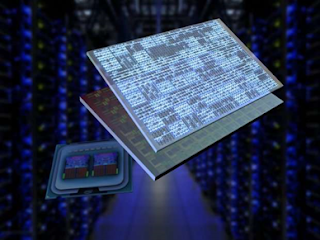
 

Optical chips will power our future datacenters and supercomputers. Electronic chips can now have a layer of optical components, like lasers and switches, added to it, to increase their computing power. Credit: Martijn Heck, Aarhus University

Since their invention, computers have become faster and faster, as a result of our ability to increase the number of transistors on a processor chip.

Today, your smartphone is millions of times faster than the computers NASA used to put the first man on the moon in 1969. It even outperforms the most famous supercomputers from the 1990s. However, we are approaching the limits of this electronic technology, and now we see an interesting development: light and lasers are taking over electronics in computers.

Processors can now contain tiny lasers and light detectors, so they can send and receive data through small optical fibres, at speeds far exceeding the copper lines we use now. A few companies are even developing optical processors: chips that use laser light and optical switches, instead of currents and electronic transistors, to do calculations.

So, let us first take a closer look at why our current technology is running out of steam. And then, of course, answer the main question: when can you buy that optical computer?

Moore's Law is dying

Computers work with ones and zeros for all their calculations and transistors are the little switches that make that happen. Current processor chips, or integrated circuits, consist of billions of transistors. In 1965, Gordon Moore, founder of Intel, predicted that the number of transistors per chip would double every two years. This became known as Moore's Law, and after more than half a century, it is still alive. Well, it appears to be alive...

In fact, we are fast reaching the end of this scaling. Transistors are now approaching the size of an atom, which means that quantum mechanical effects are becoming a bottleneck. The electrons, which make up the current, can randomly disappear from such tiny electrical components, messing up the calculations.

Moreover, the newest technology, where transistors have a size of only five nanometers, is now so complex that it might become too expensive to improve. A semiconductor fabrication plant for this five-nanometer chip technology, to be operational in 2020, has already cost a steep 17 billion US dollars to build.


Computer processor chips have plateaued

Looking more closely, however, the performance growth in transistors has been declining. Remember the past, when every few years faster computers hit the market? From 10 MHz clock speed in the 80s, to 100 MHz in the 90s and 1 GHz in 2000? That has stopped, and computers have been stuck at about 4 GHz for over 10 years.

Of course with smart chip design, for example using parallel processing in multi-core processors, we can still increase the performance, so your computer still works faster, but this increased speed is not due to the transistors themselves.

And these gains come at a cost. All those cores on the processor need to communicate with each other, to share tasks, which consumes a lot of energy. So much so that the communication on and between chips is now responsible for more than half of the total power consumption of the computer.

Since computers are everywhere, in our smartphone and laptop, but also in datacenters and the internet, this energy consumption is actually a substantial amount of our carbon footprint.

For example, there are bold estimations that intense use of a smartphone connected to the Internet consumes the same amount of energy as a fridge. Surprising, right? Do not worry about your personal electricity bill, though, as this is the energy consumed by the datacenters and networks. And the number and use of smartphones and other wearable tech keeps growing.

Fear not: lasers to the rescue

So, how can we reduce the energy consumption of our computers and make them more sustainable? The answer becomes clear when we look at the Internet.

In the past, we used electrical signals, going through copper wires, to communicate. The optical fibre, guiding laser light, has revolutionised communications, and has made the Internet what it is today: Fast and extending across the entire world. You might even have fibre all the way to your home.

We are using the same idea for the next generation computers and servers. No longer will the chips be plugged in on motherboards with copper lines, but instead we will use optical waveguides. These can guide light, just like optical fibres, and are embedded into the motherboard. Small lasers and photodiodes are then used to generate and receive the data signal. In fact, companies like Microsoft are already considering this approach for their cloud servers.

Optical chips are already a reality

Now I know what you're thinking around about now:

"But wait a second, how will these chips communicate with each other using light? Aren't they built to generate an electrical current?"

Yes, they are. Or, at least, they were. But interestingly, silicon chips can be adapted to include transmitters and receivers for light, alongside the transistors.

Researchers from the Massachusetts Institute of Technology in the US have already achieved this, and have now started a company (Ayar Labs) to commercialise the technology.

Here at Aarhus University in Denmark we are thinking even further ahead: If chips can communicate with each other optically, using laser light, would it not also make sense that the communication on a chip—between cores and transistors—would benefit from optics?

We are doing exactly that. In collaboration with partners across Europe, we are figuring out whether we can make more energy-efficient memory by writing the bits and bytes using laser light, integrated on a chip. This is very exploratory research, but if we succeed, it could change future chip technology as early as 2030.

The future: optical computers on sale in five years?

So far so good, but there is a caveat: Even though optics are superior to electronics for communication, they are not very suitable for actually carrying out calculations. At least, when we think binary—in ones and zeros.

Here the human brain may hold a solution. We do not think in a binary way. Our brain is not digital, but analogue, and it makes calculations all the time.

Computer engineers are now realising the potential of such analogues, or brain-like, computing, and have created a new field of neuromorphic computing, where they try to mimic how the human brain works using electronic chips.

And in turns out that optics are an excellent choice for this new brain-like way of computing.

The same kind of technology used by MIT and our team, at Aarhus University, to create optical communications between and on silicon chips, can also be used to make such neuromorphic optical chips.

In fact, it has already been shown that such chips can do some basic speech recognition. And two start-ups in the US, Lightelligence and Lightmatter, have now taken up the challenge to realise such optical chips for artificial intelligence.

Optical chips are still some way behind electronic chips, but we're already seeing the results and this research could lead to a complete revolution in computer power. Maybe in five years from now we will see the first optical co-processors in supercomputers. These will be used for very specific tasks, such as the discovery of new pharmaceutical drugs.

But who knows what will follow after that? In ten years these chips might be used to detect and recognise objects in self-driving cars and autonomous drones. And when you are talking to Apple's Siri or Amazon's Echo, by then you might actually be speaking to an optical computer.

While the 20th century was the age of the electron, the 21st century is the age of the photon – of light. And the future shines bright.


From <https://phys.org/news/2018-03-optical-horizon.html>


 For all discussed seminar topics list click here Index.

…till next post, bye-bye and take care.